Overview 15 UI Layouts Live Lyrics & Widgets Audio Engine Wrapped Stats & Cloud FAQ & Support
Download APK GitHub Repo ☕ Buy Me a Coffee
Android 7.0+ · 100% Offline & Ad-Free

Your Music.
Your Way.

An offline-first, ad-free Android music player built for listeners who want studio-grade sound, 15 customizable UI layouts, real-time synced lyrics widgets, and complete control over their local library.

15 UI Layouts • 5 Adaptive Widgets • 12 Audio Formats • Zero Subscriptions
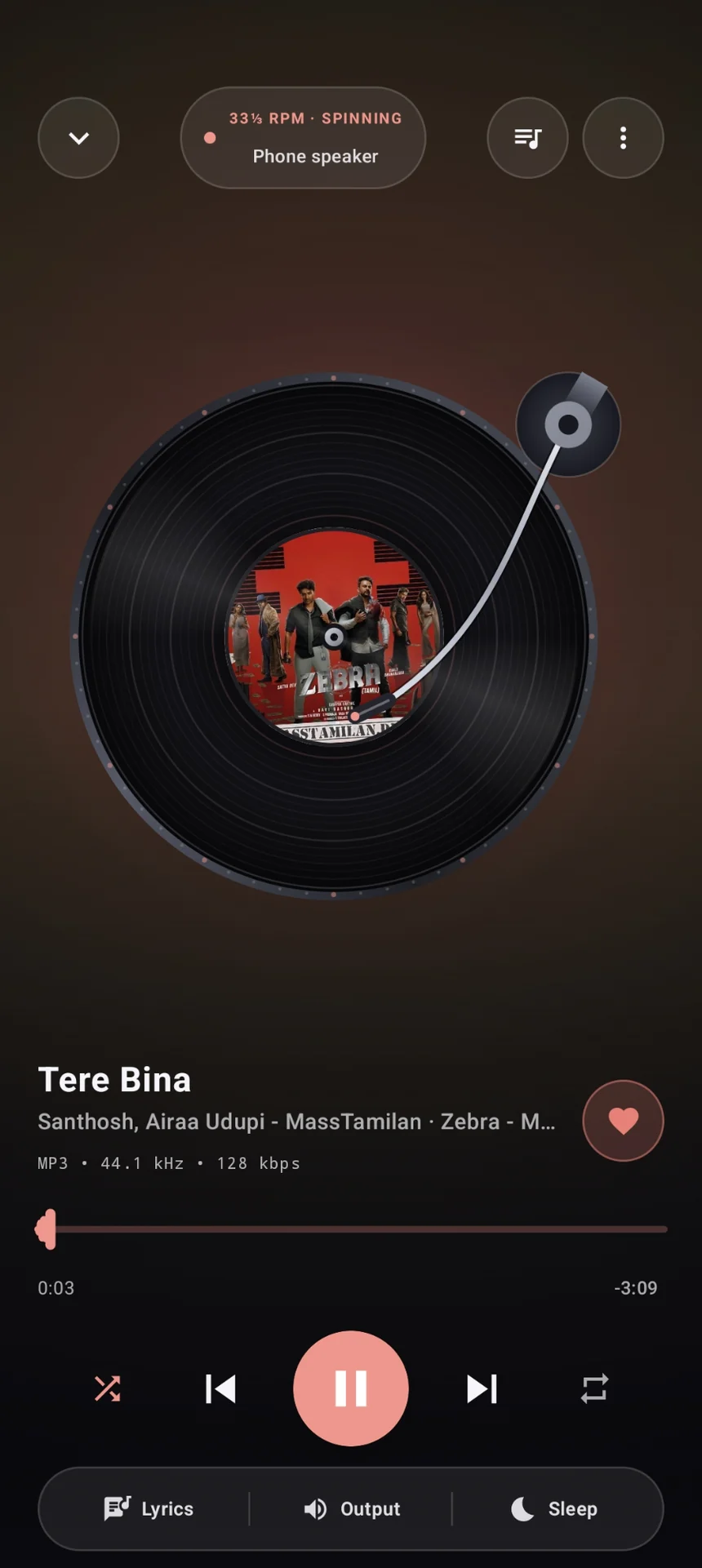
OffGrid Music Vinyl Turntable Now Playing screen
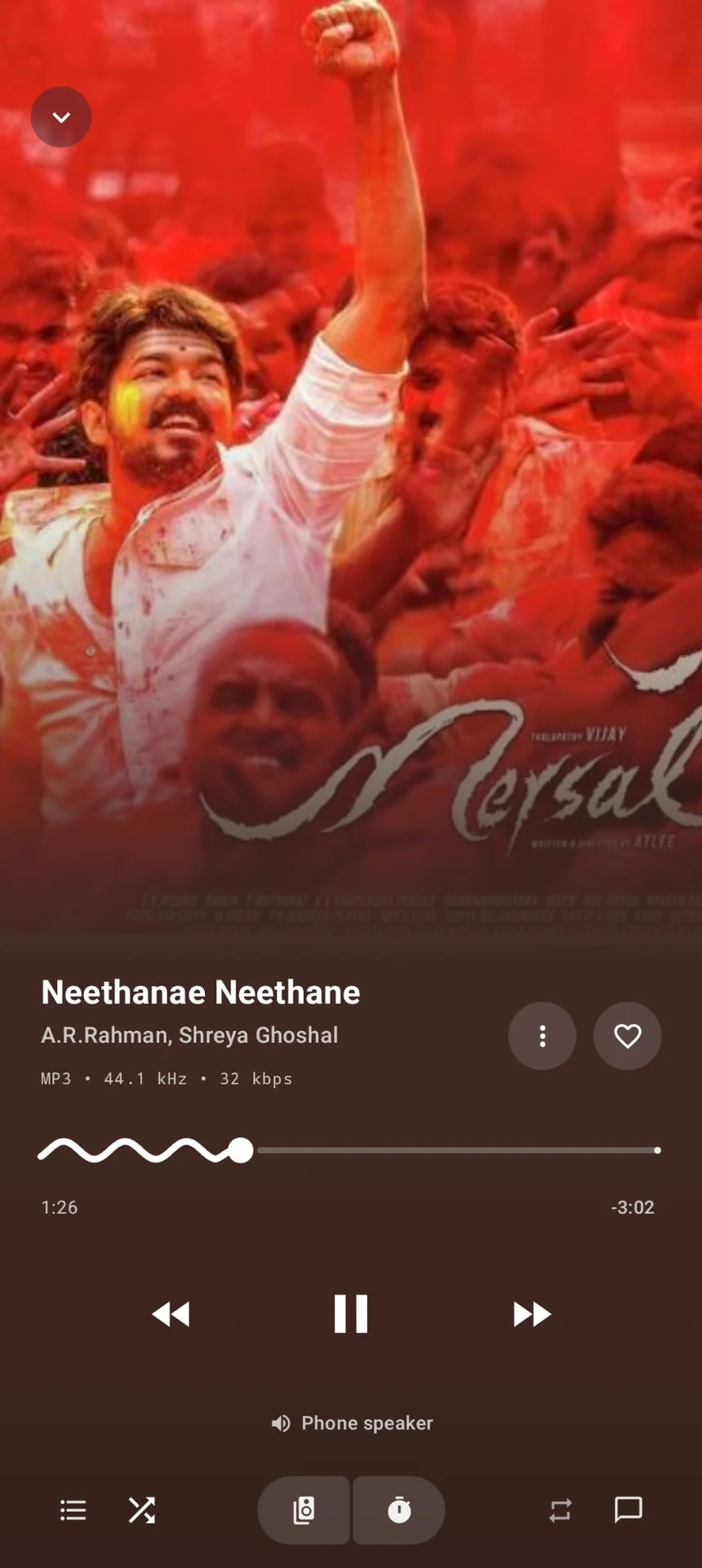
OffGrid Music Modern Bento Now Playing screen
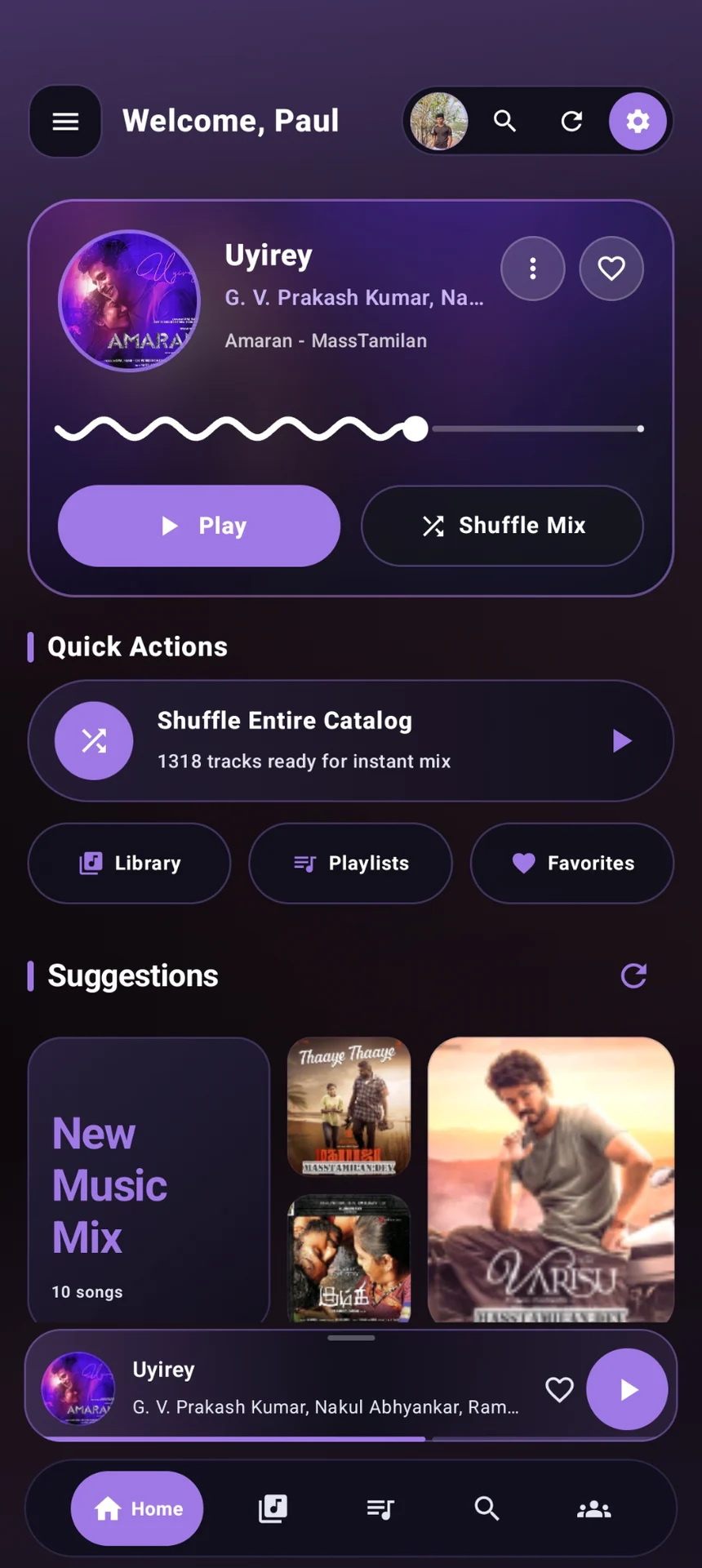
OffGrid Music Hero Spotlight Home screen
Built for Comfort & Control

Everything a flagship offline music player should be.

No forced streaming catalogs, no ads interrupting your albums, and no outdated UI stuck in 2015.

15 UI Layouts

Live Screen Layout Studio

Mix and match 4 Now Playing, 4 Home, 4 Playlists, and 3 Lyrics UI screens with real-time live previews and Combo View before you apply—using your currently playing song and artwork.
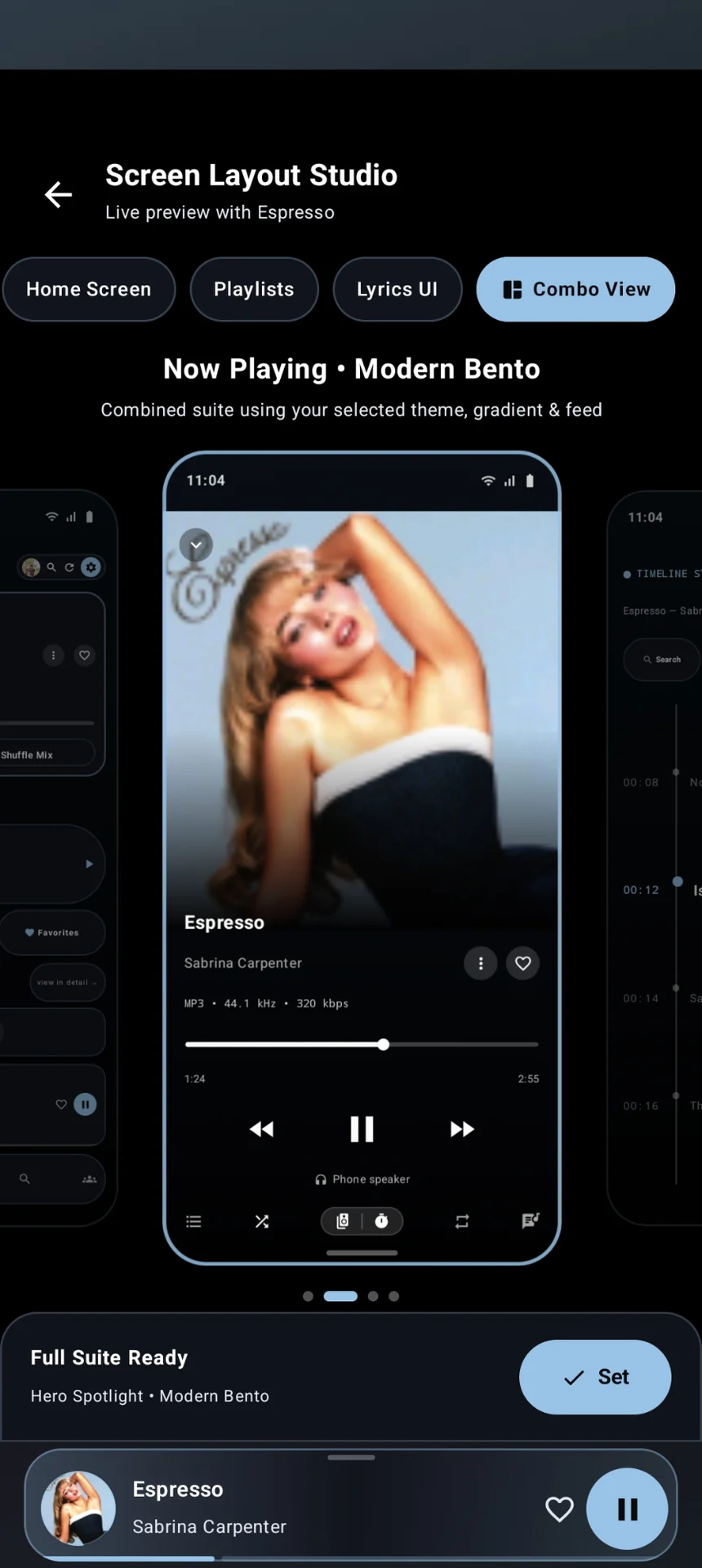
OffGrid Music Screen Layout Studio Combo View showing live Espresso preview
Live .LRC

Home Screen Live Lyrics Widget

Watch synchronized lyrics scroll right on your Android home screen across English, Tamil, Hindi, and more—complete with playback controls and seek bar.
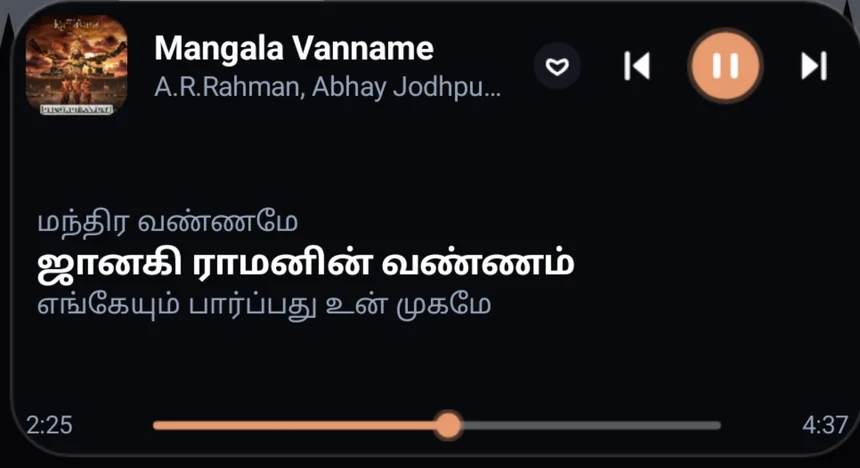
OffGrid Music Live Lyrics Widget showing Tamil synced lyrics
0–12s

Equal-Power Crossfade & 5-Band EQ

Gapless playback, custom fade-in/out ramps, loudness normalization, stereo balance, Bass Boost, and 3D Surround.

2–10

OffGrid Jam — Listen Together

Host synced listening rooms via Invite Code, Link, or QR Scanner and share local songs up to 25 MB directly device-to-device.

12 Formats

Lossless & Local Ready

Duplicate-free scanning, folder include/exclude rules, short-clip filter, ID3 tag editor, and one-tap Tag Cleaner.
FLACMP3OPUSWAVM4AAACOGGAIFF
Chapter 01 · Interactive UI Studio

15 Screens. One Player.

Select any screen category below to explore its layouts cleanly—each option updates the live phone preview instantly.

Now Playing: Modern Bento layout Now Playing: Vinyl Turntable layout Now Playing: Minimalist Glass layout Now Playing: Neon Studio layout Home Screen: Hero Spotlight layout Home Screen: Studio Deck layout Home Screen: Minimal Stream layout Home Screen: Bento Mosaic layout Lyrics UI: Studio Timeline layout Lyrics UI: Classic Bento layout Lyrics UI: Fluid Glow layout Playlists UI: Bento Grid layout Playlists UI: Magazine Hero layout Playlists UI: Compact List layout Playlists UI: Neon Deck layout
Now Playing · 1 / 4
Modern Bento
Now Playing 01 / 04

Modern Bento

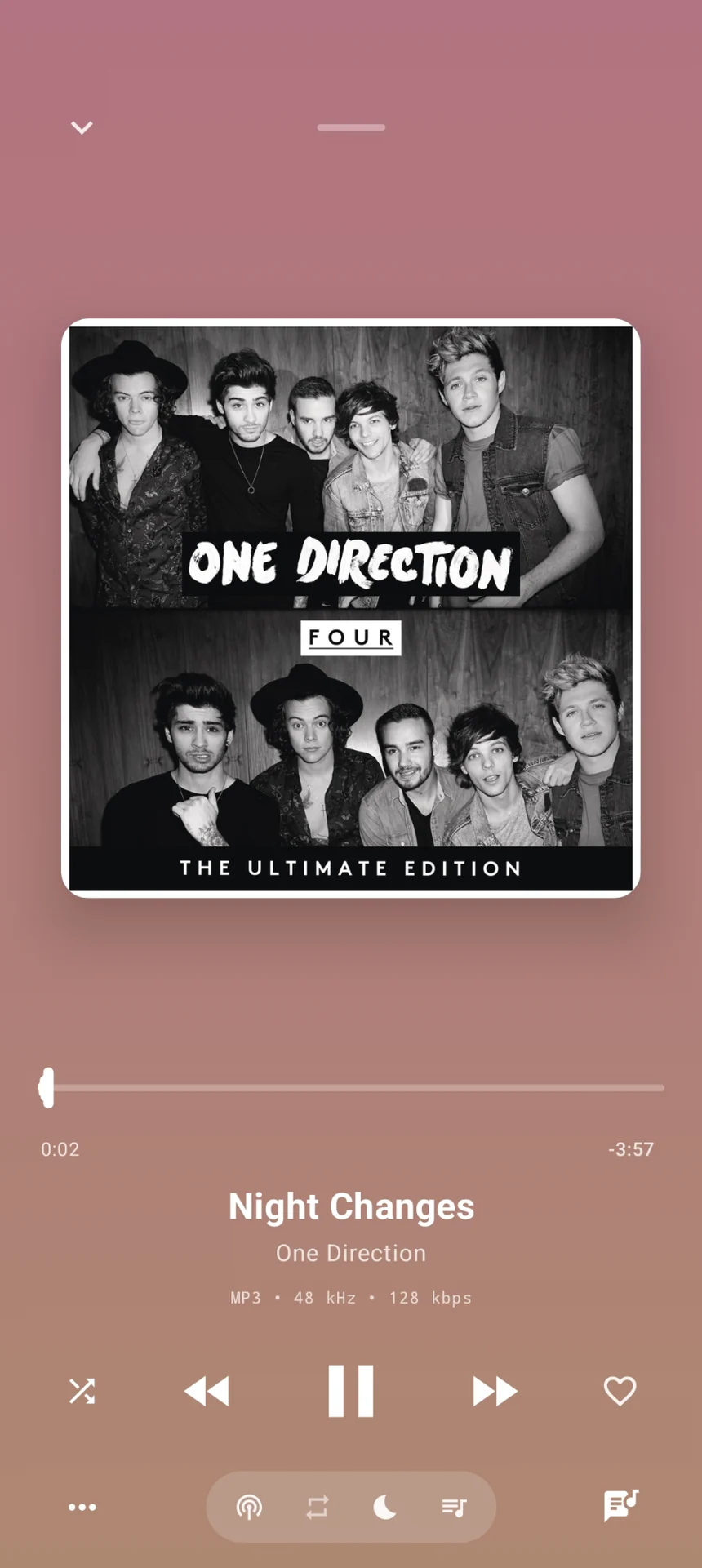
Full-bleed edge-to-edge album artwork fading seamlessly into a dynamic color-matched control deck with wavy seekbar and live codec specs.

Now Playing 02 / 04

Vinyl Turntable

A spinning 33⅓ RPM vinyl platter with animated tonearm, album center label, live output badge, and quick Lyrics, Output, and Sleep shortcuts.

Now Playing 03 / 04

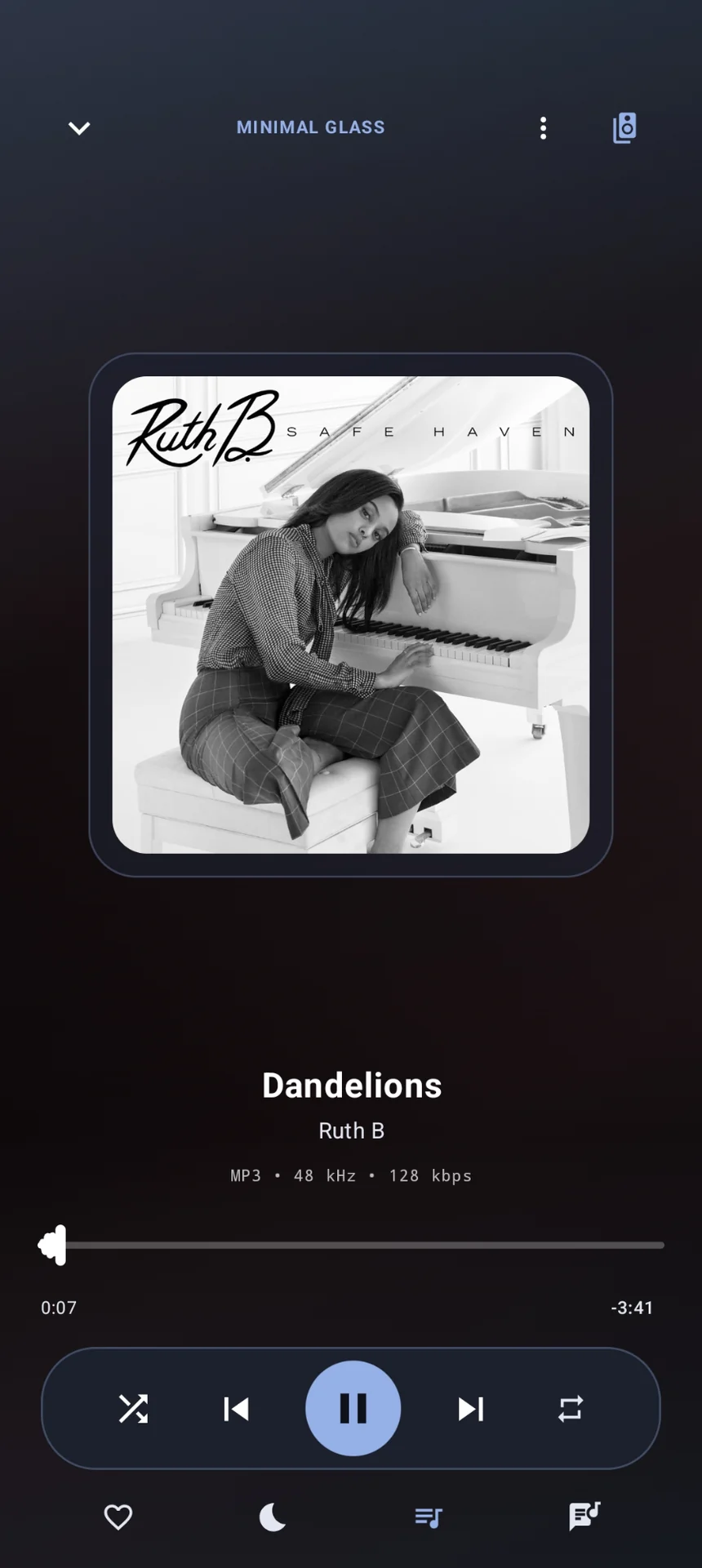
Minimalist Glass

Framed square album cover on an ultra-clean AMOLED canvas with translucent frosted-glass pill transport controls.

Now Playing 04 / 04

Neon Studio

Atmospheric full-screen color wash extracted dynamically from the active cover art, paired with floating glass action pills.

Home Screen 01 / 04

Hero Spotlight

Personalized greeting, active track waveform card, one-tap Shuffle Entire Catalog, and vibrant New Music Mix collage.

Home Screen 02 / 04

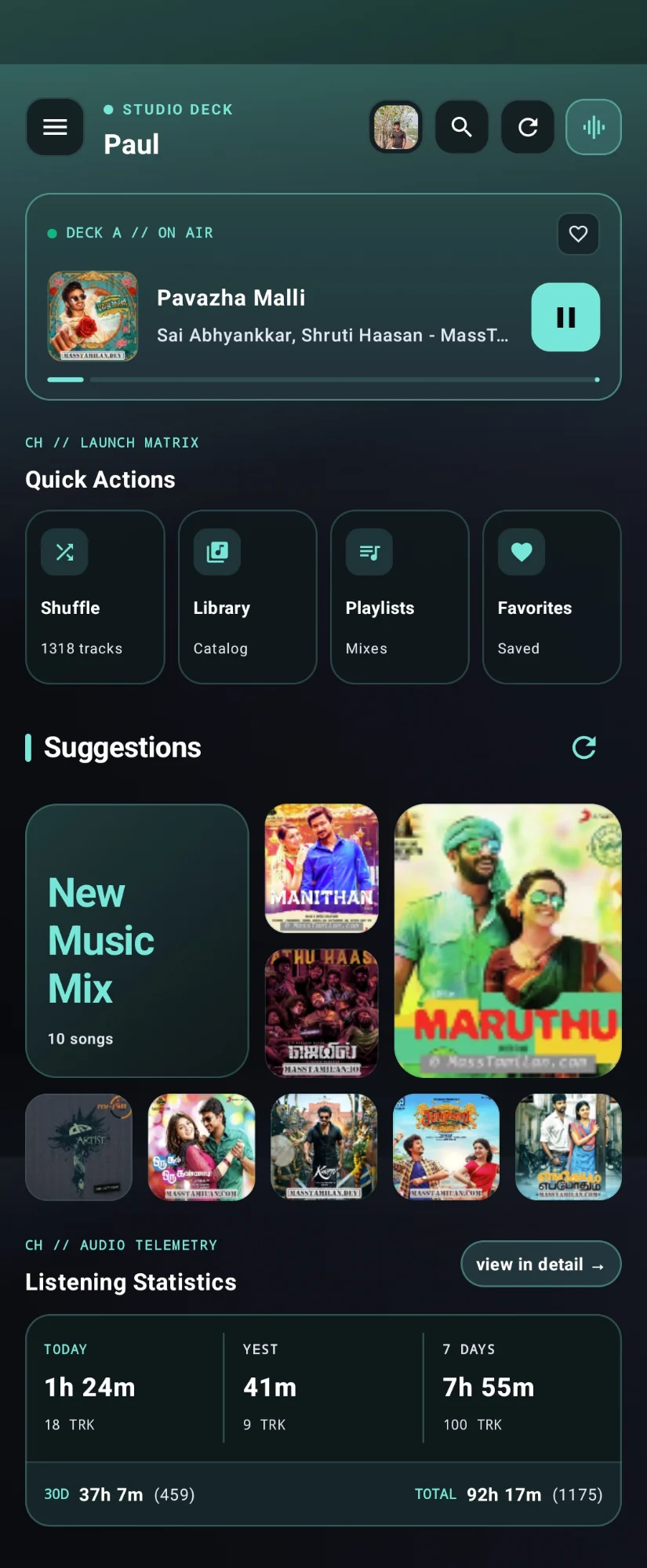
Studio Deck

Pro-audio console aesthetic with ON AIR deck status, 4-tile Launch Matrix, and built-in Audio Telemetry listening stats.

Home Screen 03 / 04

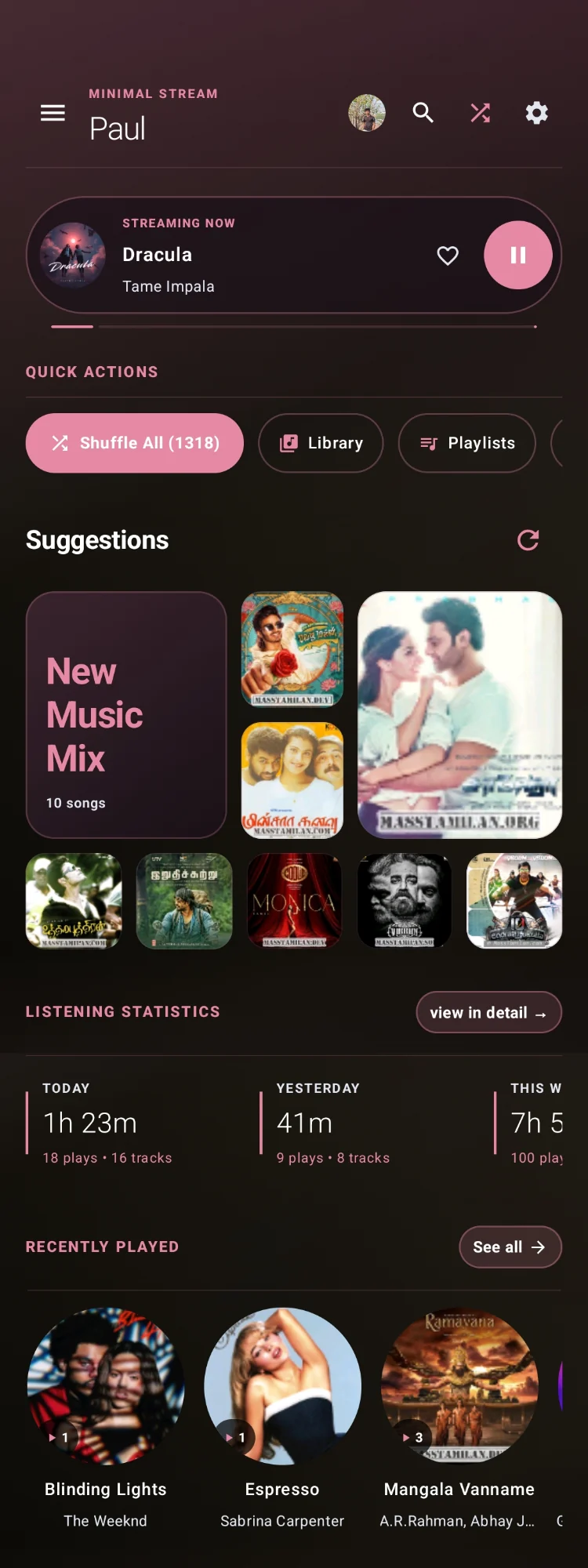
Minimal Stream

Streamlined editorial feed with compact streaming bar, horizontal quick chips, stats overview, and circular Recently Played cards.

Home Screen 04 / 04

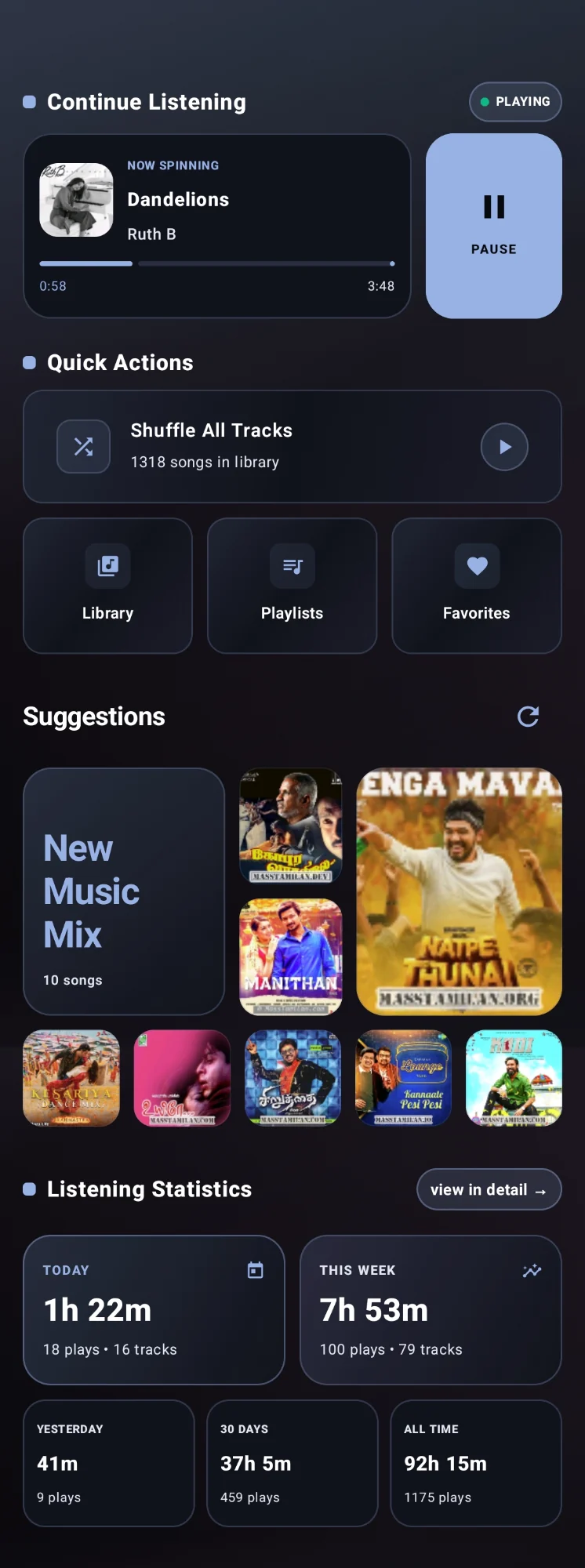
Bento Mosaic

Modular bento cards for Continue Listening, giant tap-friendly Pause button, Quick Actions, and multi-period Listening Statistics.

Lyrics UI 01 / 03

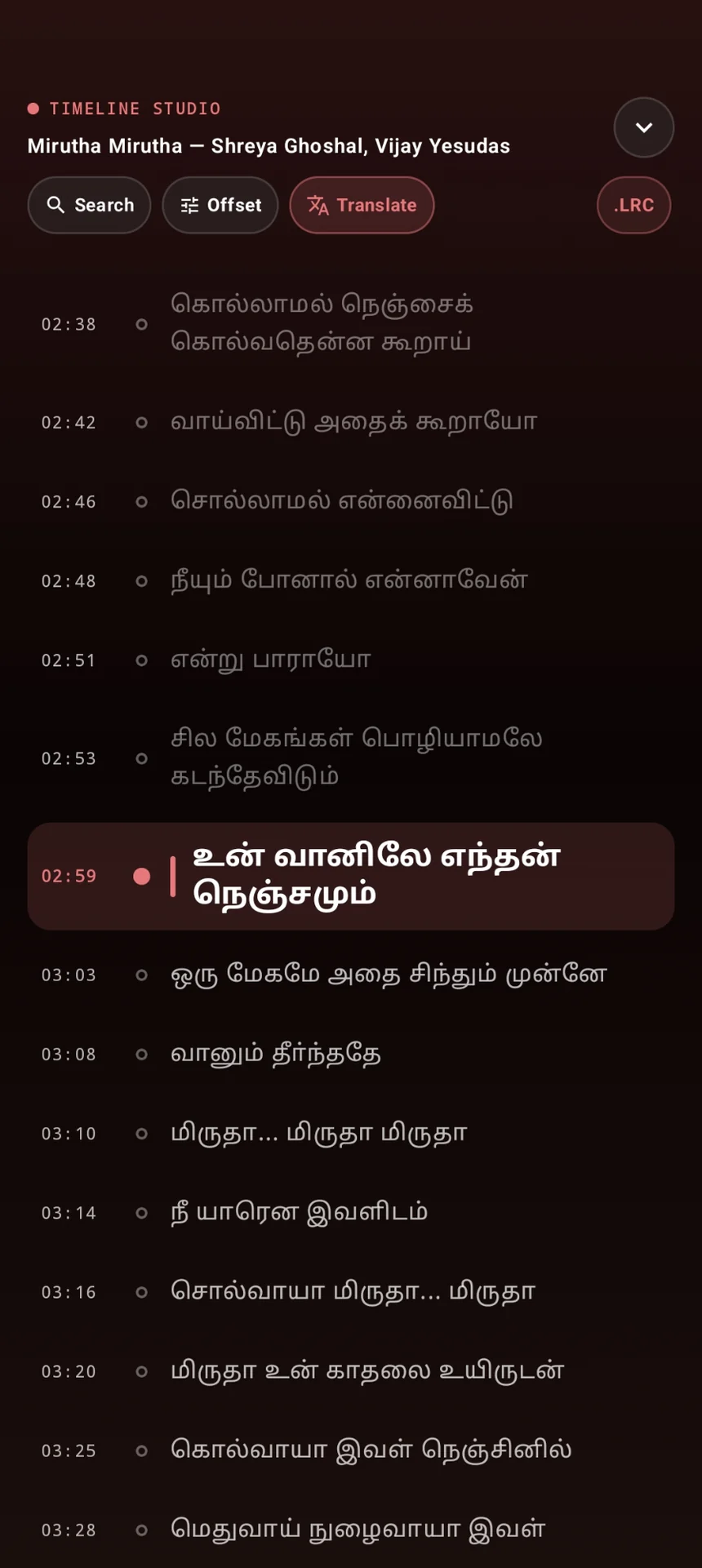
Studio Timeline

Precision timestamp markers on a vertical timeline track—tap any line to seek immediately, adjust ±ms offset, or translate on the fly.

Lyrics UI 02 / 03

Classic Bento

Centered karaoke-style synced lyrics with a bold highlighted active pill so every line is effortless to read from across the room.

Lyrics UI 03 / 03

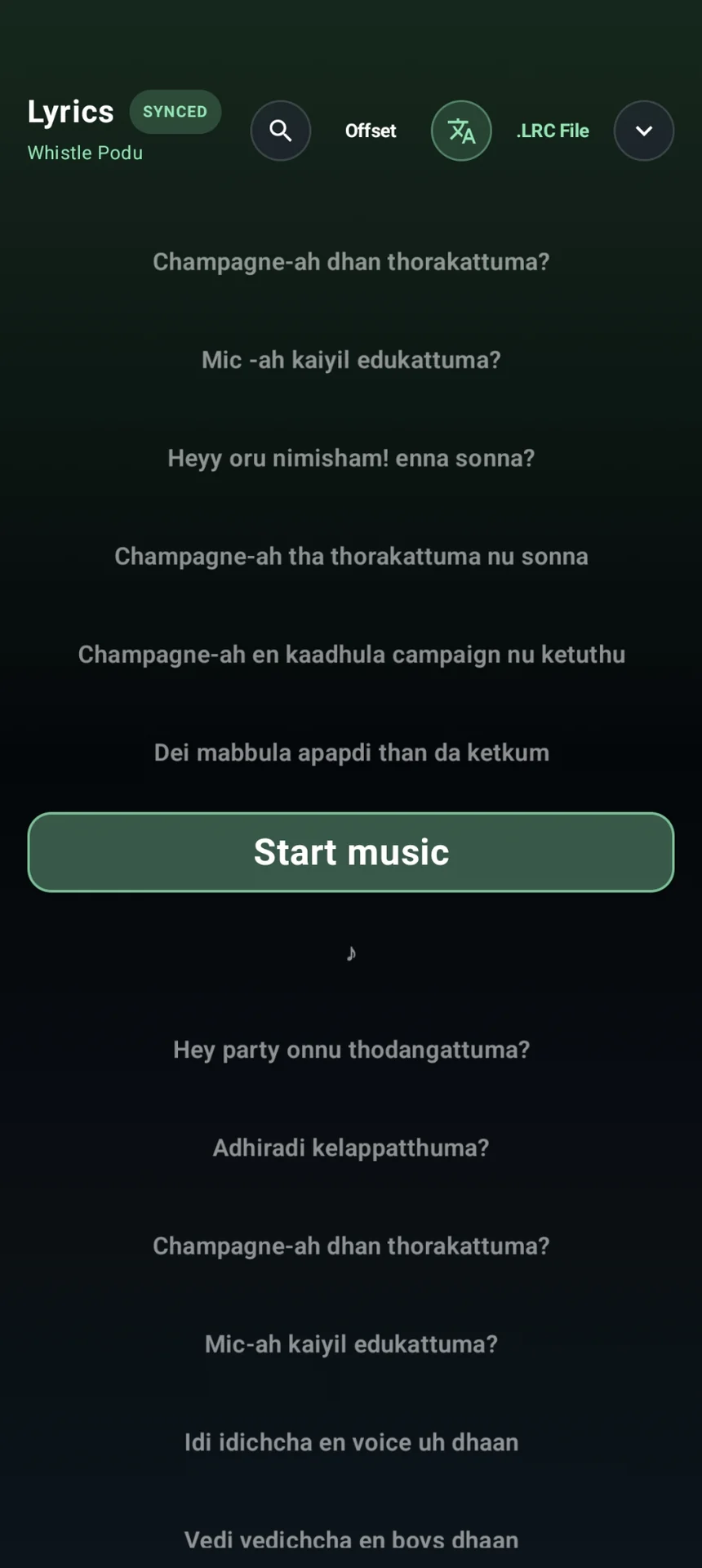
Fluid Glow

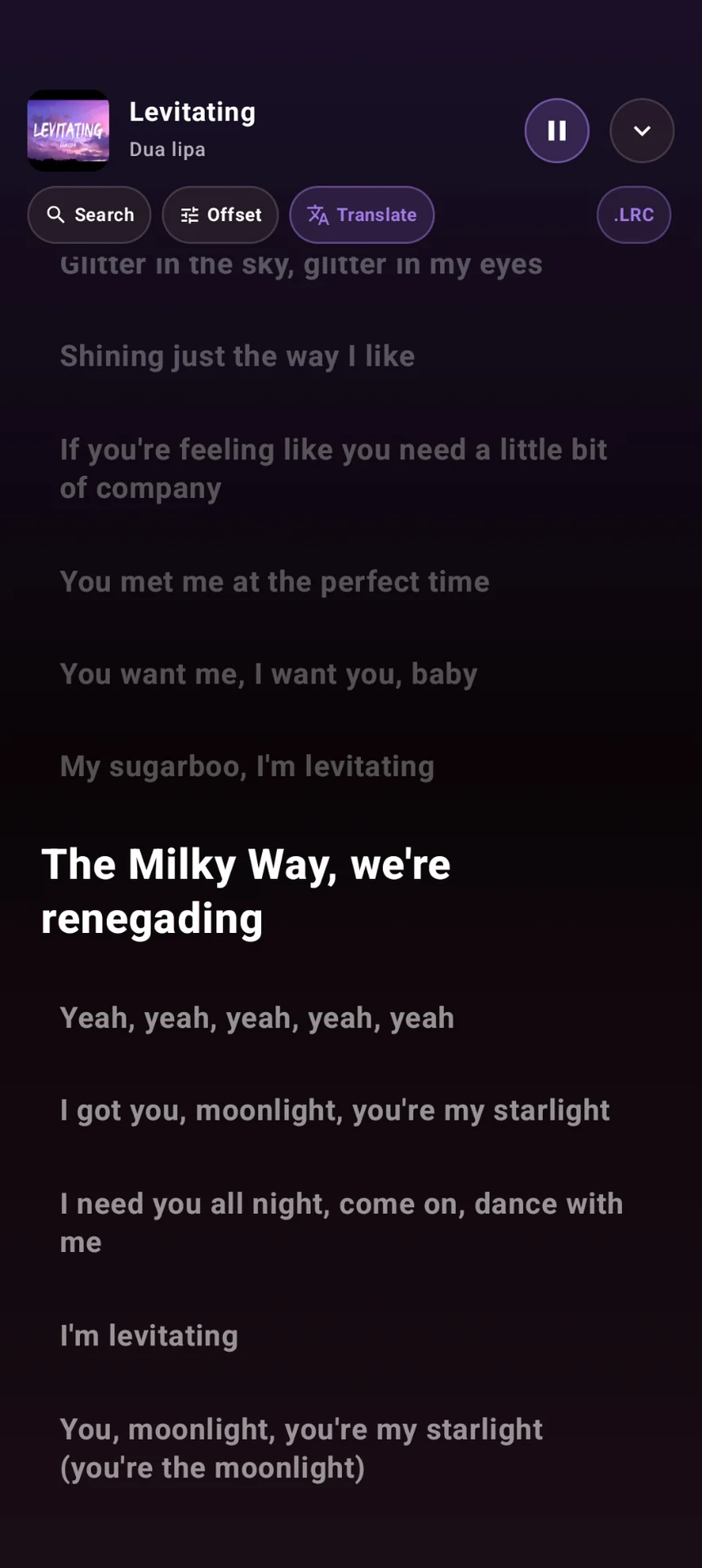
Large, bold typography with soft ambient background glow and quick header controls for Search, Offset, and AI Translate.

Playlists UI 01 / 04

Bento Grid

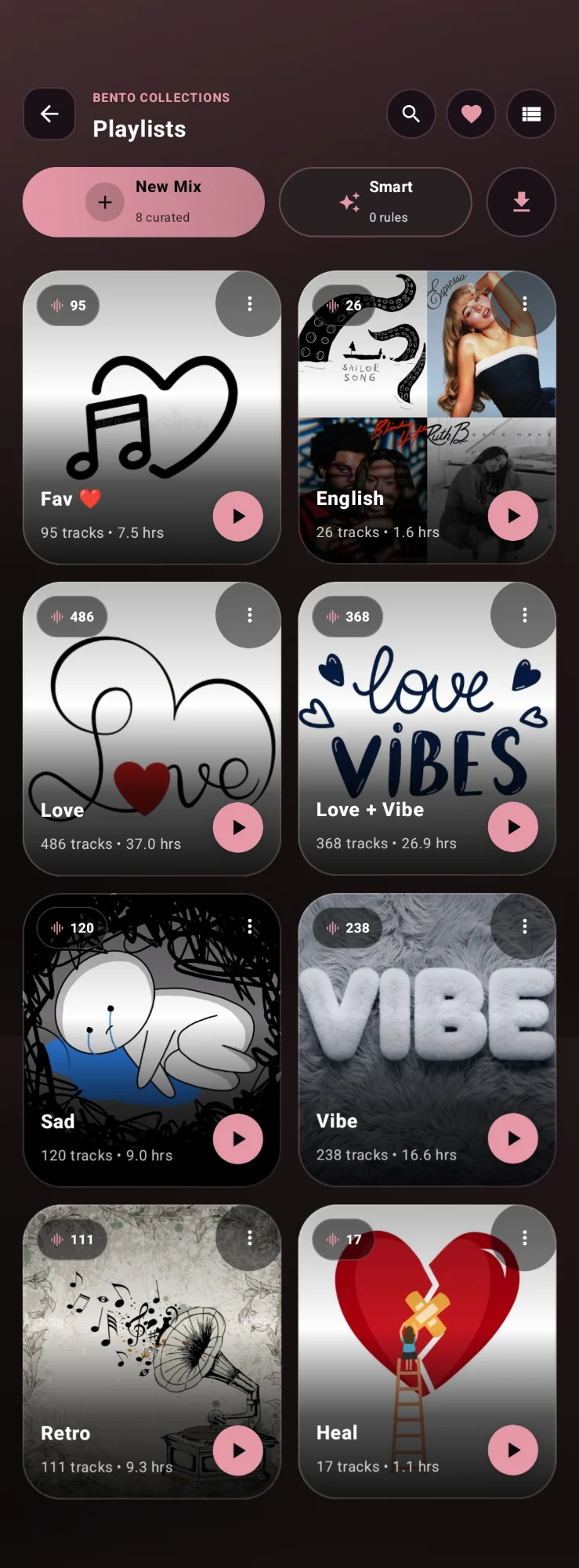
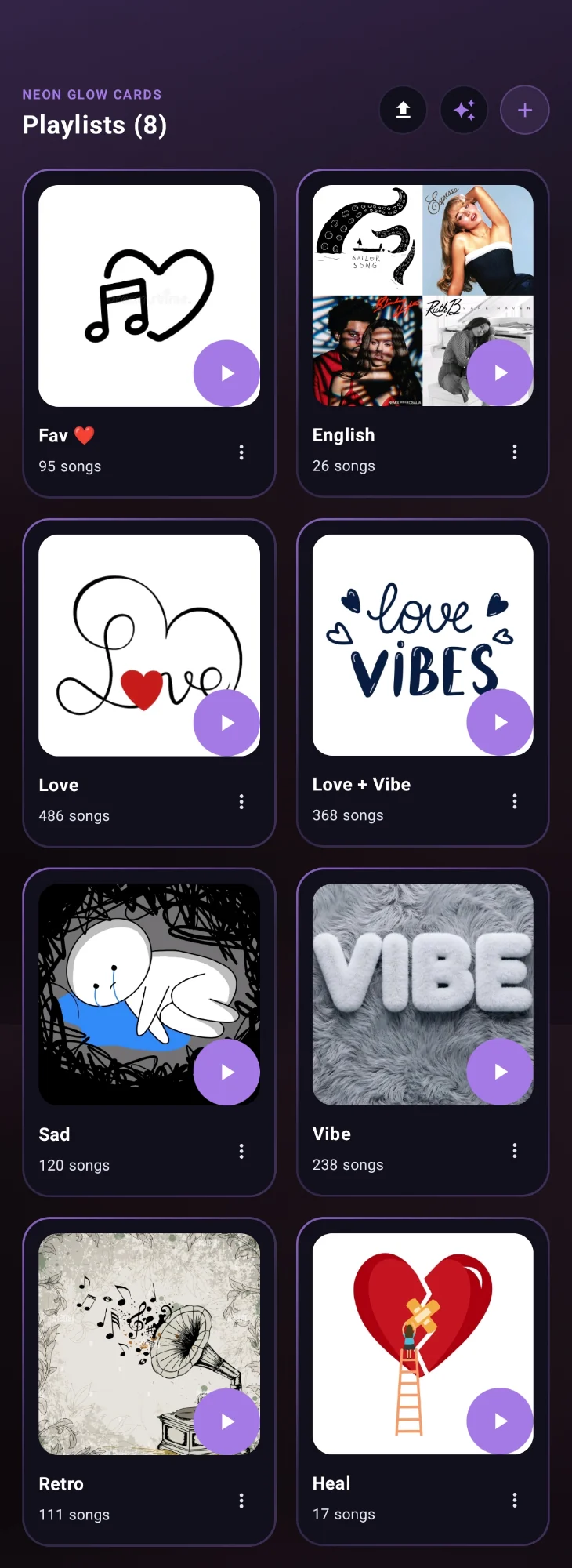
Full-bleed custom playlist covers with track counts, total duration, Smart Playlist creator, and M3U/M3U8 import.

Playlists UI 02 / 04

Magazine Hero

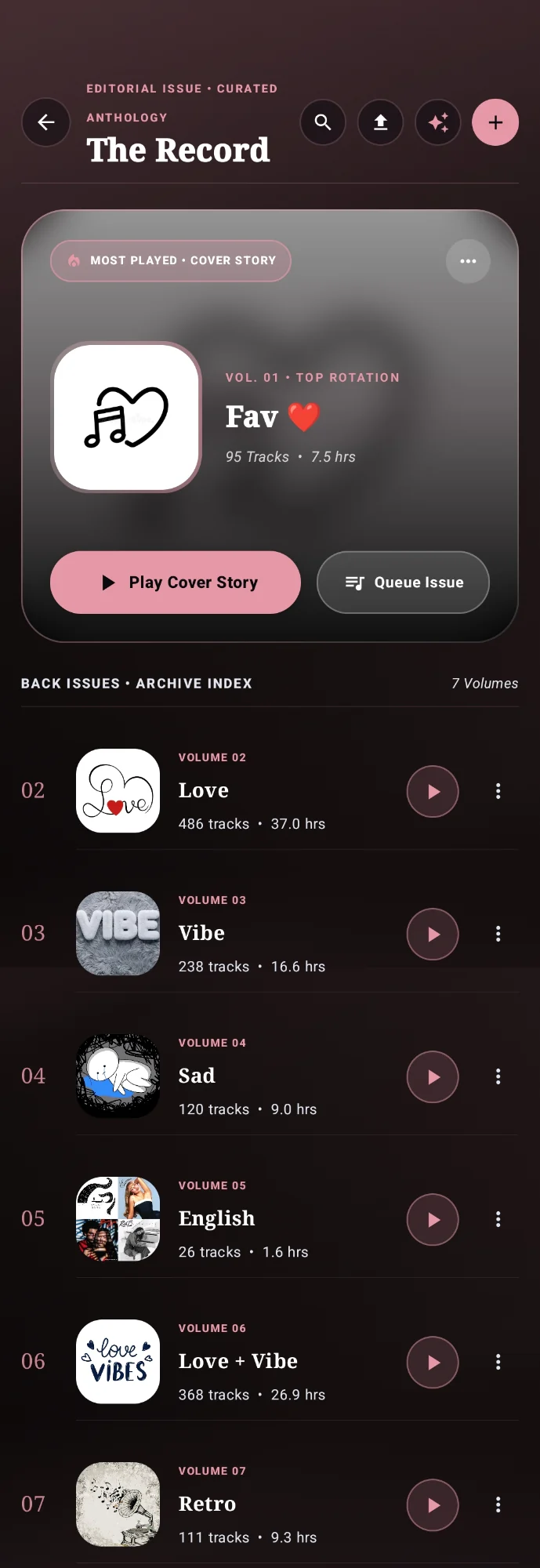
Editorial anthology layout spotlighting your Most Played playlist as a Cover Story above numbered Back Issues.

Playlists UI 03 / 04

Compact List

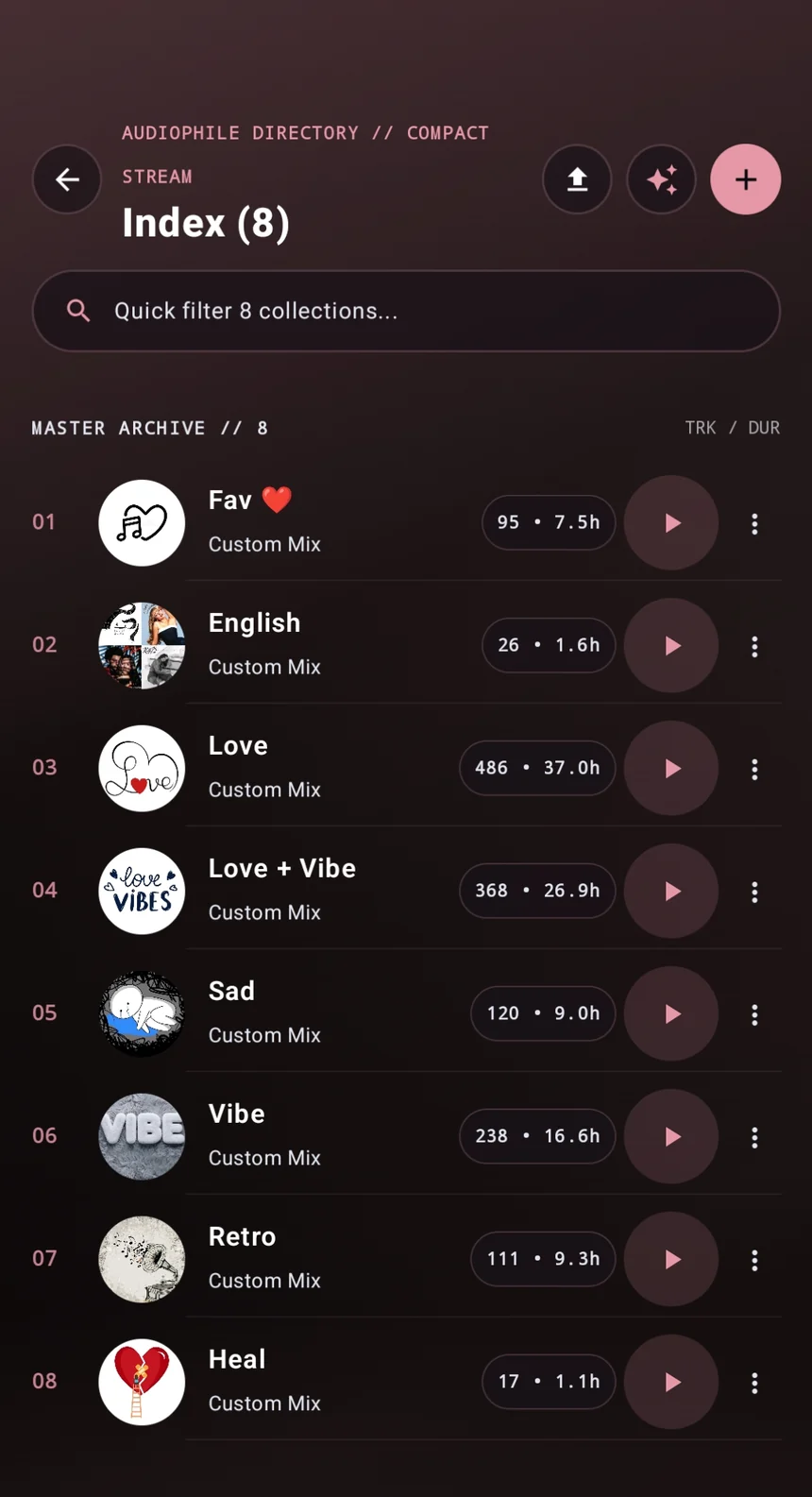
Audiophile directory index with instant filter search, track counts, runtime badges, and one-tap play controls.

Playlists UI 04 / 04

Neon Deck

Glowing bordered cards that adapt to your chosen accent palette or dynamic song artwork color.

Color Palette Engine

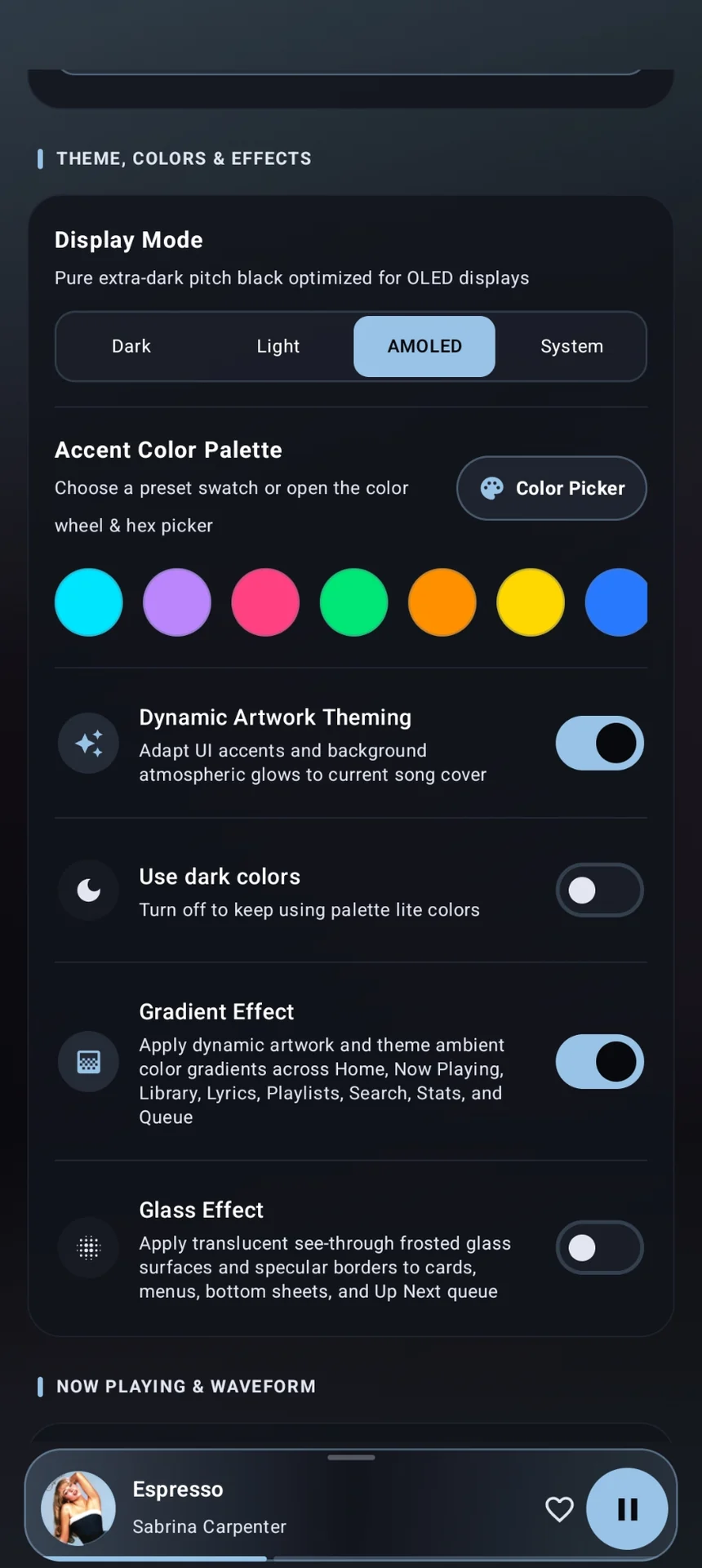
AMOLED Black, RGB Wheel & Frosted Glass

Switch between Dark, Light, Pure AMOLED Black, or System mode. Toggle Dynamic Artwork Theming, Dark Colors / Palette Lite, ambient Gradients, and translucent Glass Effects independently.
OffGrid Music Theme, Display Mode, and Accent Color Palette settings
Feed & Navigation Control

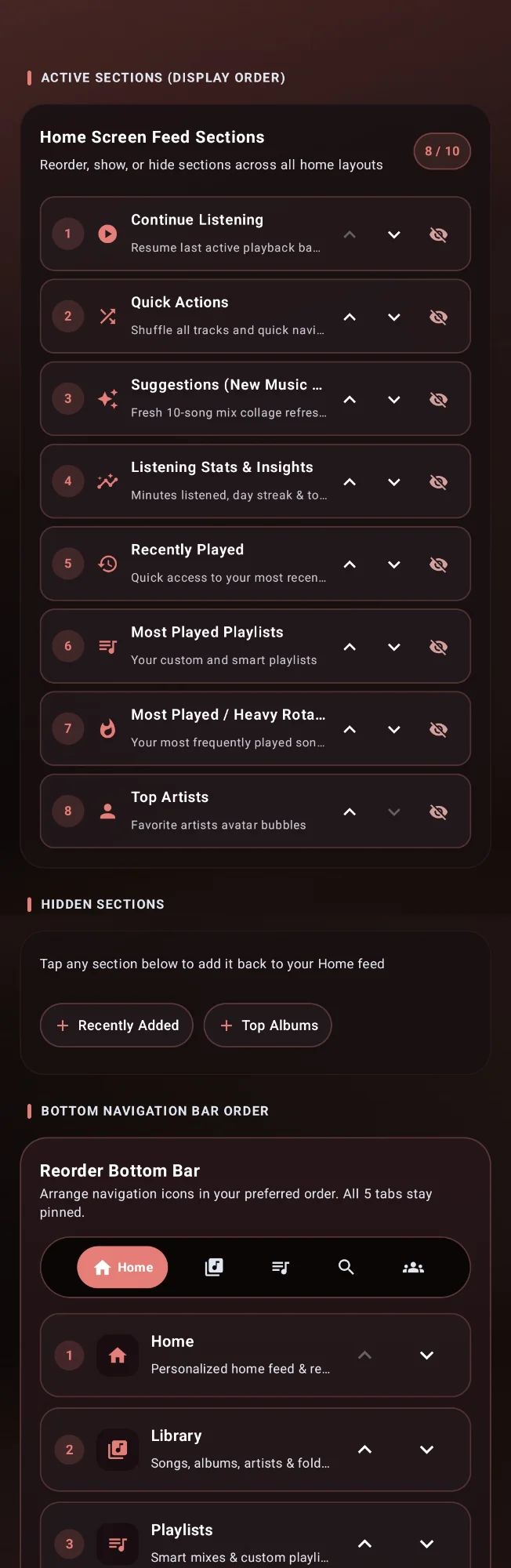
Reorder Your Home Feed & Bottom Bar

Show, hide, or reorder 10 Home Screen sections, save Custom Named Home Feed Configurations, and even rearrange your 5 bottom navigation tabs in your preferred order.
OffGrid Music Home Screen Feed and Bottom Navigation Bar reorder settings
Chapter 02 · Real-Time Synced Lyrics

Lyrics on Your Home Screen.

Watch OffGrid's adaptive Live Lyrics Widget in action—smoothly scrolling synced lines in English, Tamil, and more without even opening the app.

Live Lyrics Widget — English

LIVE CAPTURE

Real-time synced .lrc line highlighting with dynamic artwork accent colors, heart toggle, skip controls, and live progress bar right on your Android launcher.

Live Lyrics Widget — Tamil

MULTI-LANGUAGE

Crisp regional script rendering for Tamil, Hindi, Malayalam, and Tanglish—plus optional on-device Gemini AI line-by-line translation & audio transcription that preserves every timestamp.

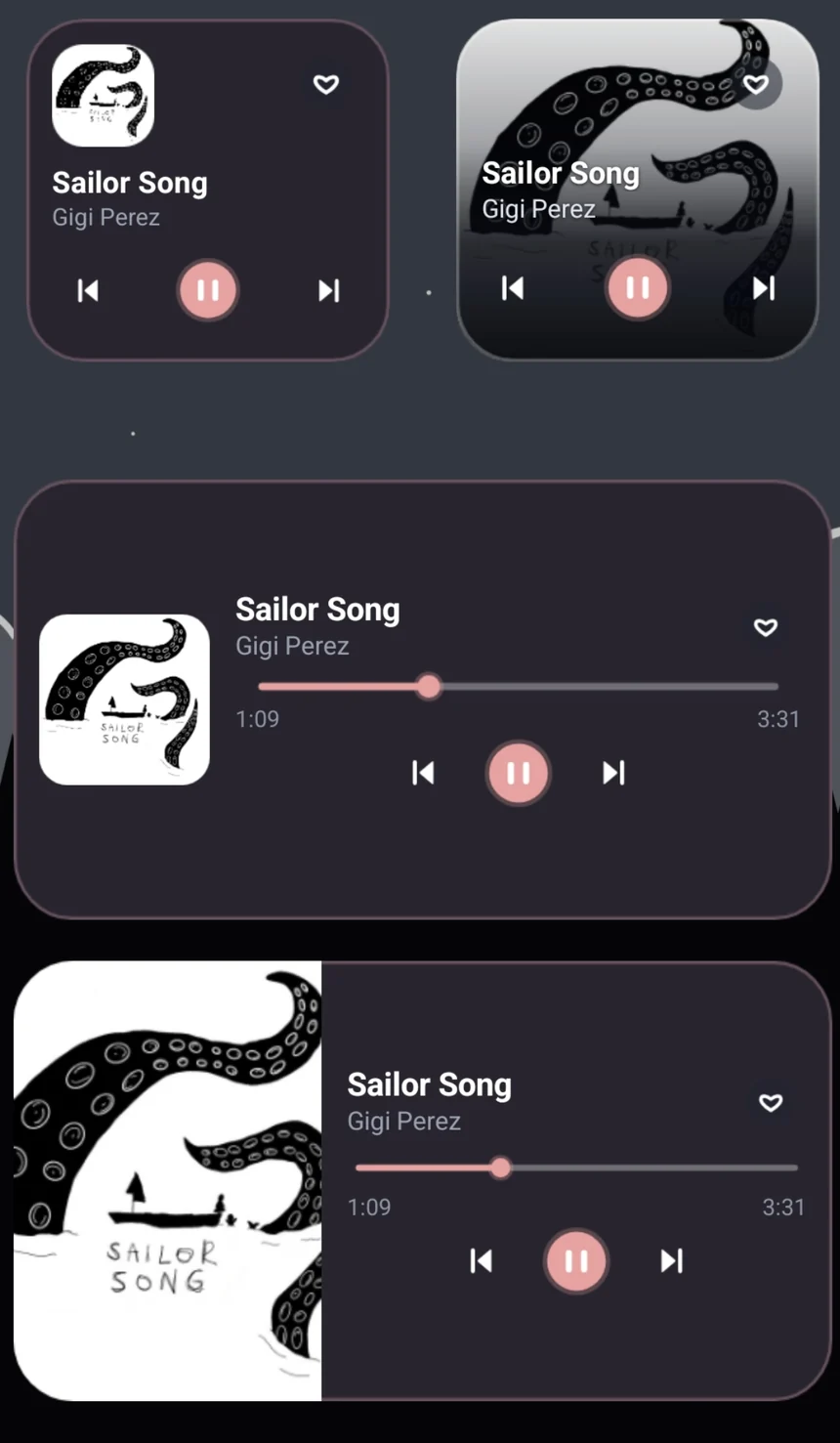
5 Adaptive Widgets

Full Artwork, Small, Medium, Secondary & Live Lyrics

Every widget dynamically extracts colors from your currently playing album art and adapts cleanly across Android home screen grid sizes.
OffGrid Music 4 Adaptive Android Home Screen Widgets — Full Pack
Multi-Source Sync

Find Synced Lyrics in One Tap

Automatically reads embedded tags and local .lrc files, or searches online for multiple synced candidates with ±ms timing offset saved locally.
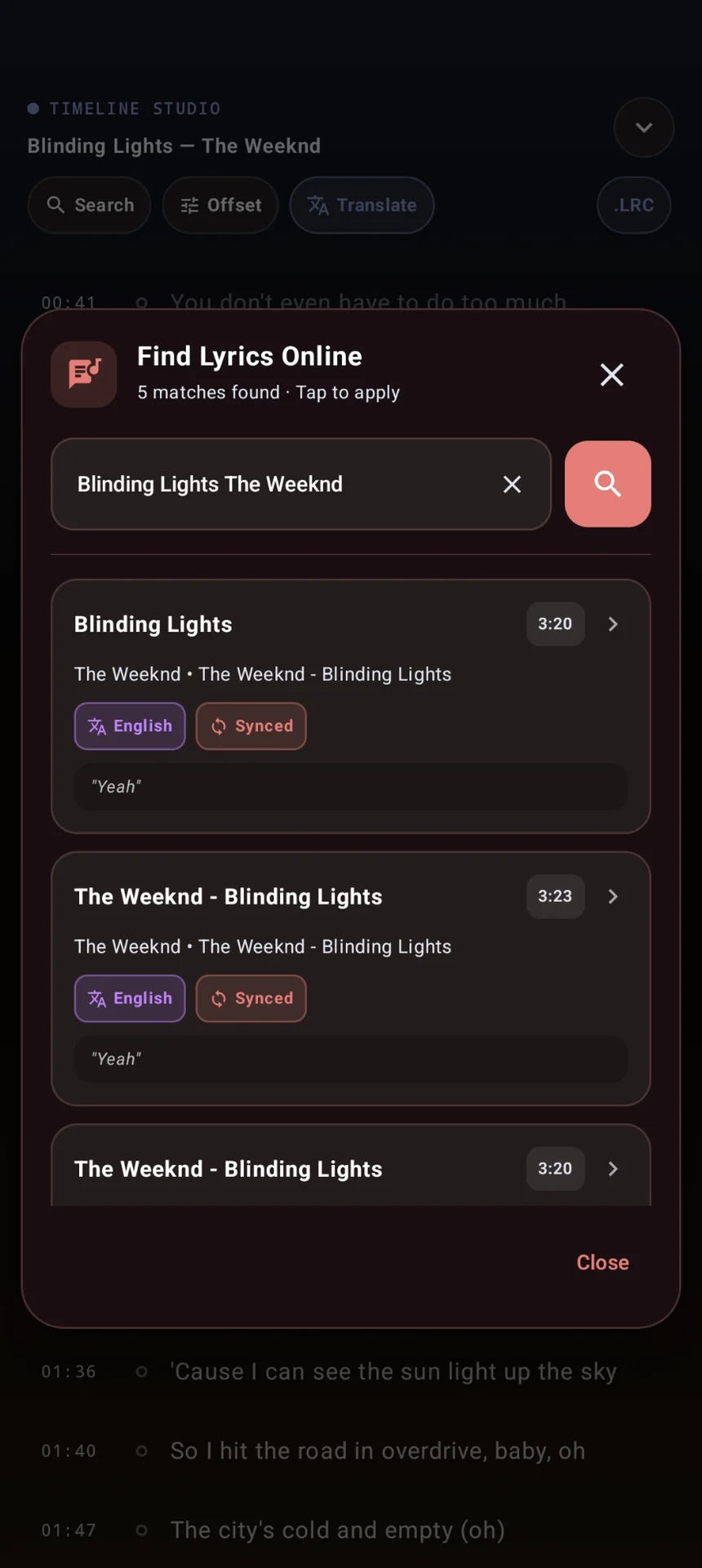
OffGrid Music Find Lyrics Online modal showing multiple synced matches
Chapter 03 · Audio Engine & Sonic Studio

Studio Sound. Zero Compromise.

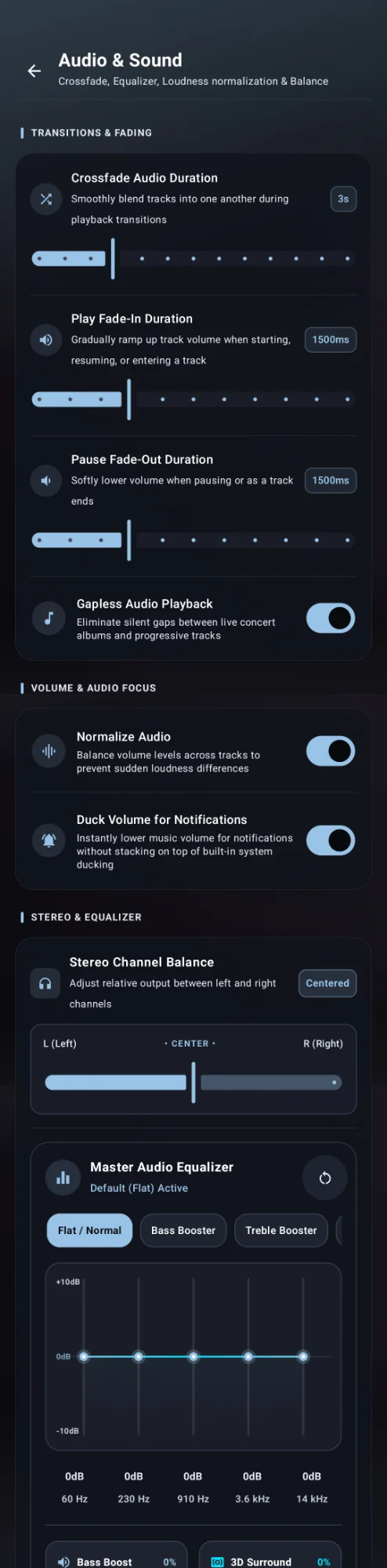
From 0–12 second equal-power crossfade and 5-band graphic EQ to A–B Loops, Timestamp Pins, and 7 seekbar waveforms.

OffGrid Music Audio and Sound settings with Crossfade, Gapless, and 5-Band Equalizer

Audio & Sound Engine

  • Gapless Playback & 0–12s Equal-Power Crossfade
  • Custom Play Fade-In & Pause Fade-Out (0–5,000 ms)
  • 5-Band Graphic EQ + 11 Presets, Bass Boost & 3D Surround
  • Normalize Audio, Stereo Balance & Notification Ducking
  • Live Output Switcher (Speaker, Aux, Bluetooth, USB DAC)
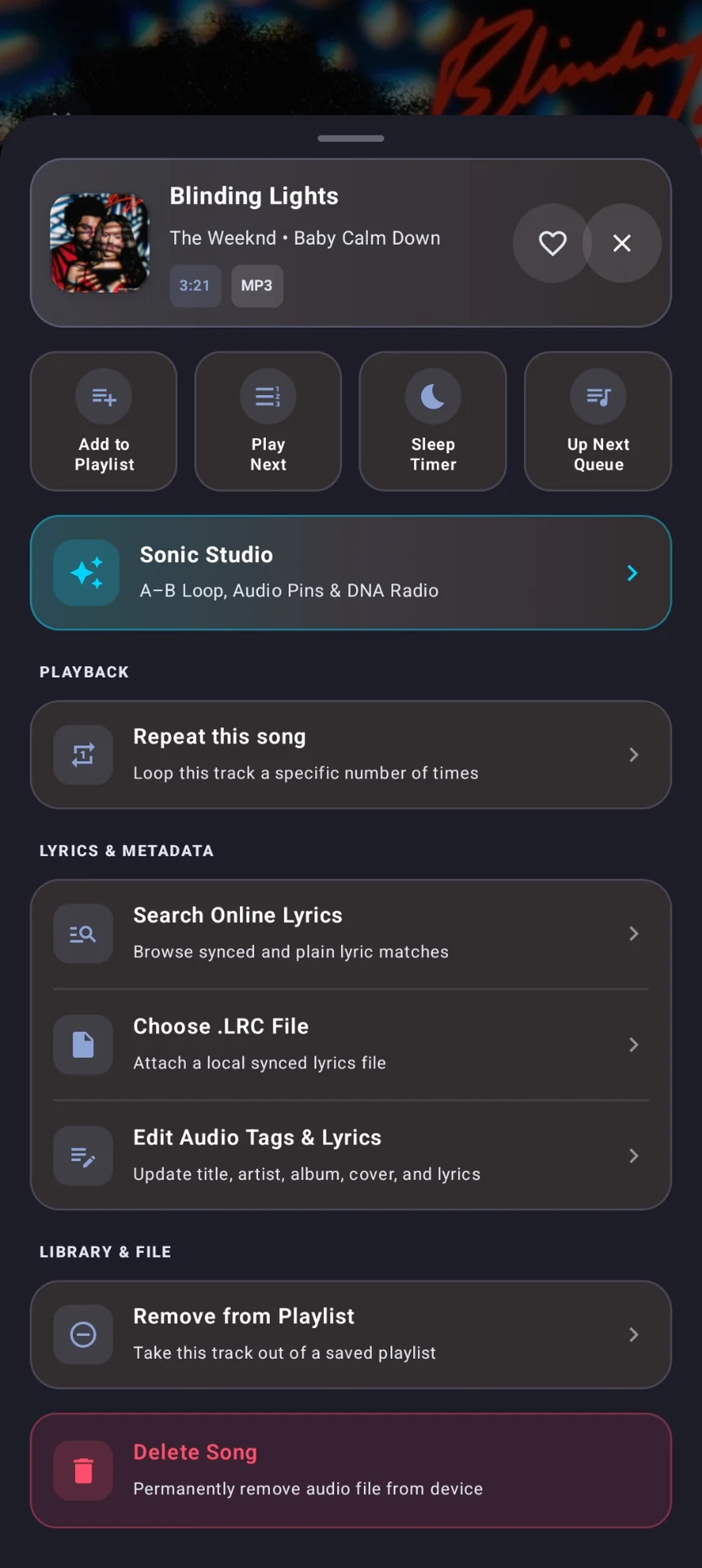
OffGrid Music Sonic Studio menu with A-B Loop, Audio Pins, DNA Radio, and Repeat This Song

Sonic Studio & Smart Controls

  • Repeat This Song (1–10×) compatible with Crossfade & Sleep Timer
  • A–B Loop: Repeat any chorus, solo, or practice section
  • Timestamp Bookmarks: Pin Intro, Beat Drop, Chorus, or Solo
  • Sonic DNA Radio: Instant 25-track vibe-matched mix
  • Album Art Swipe Gestures, Shake to Skip & On-Device ID3 Tag Editor
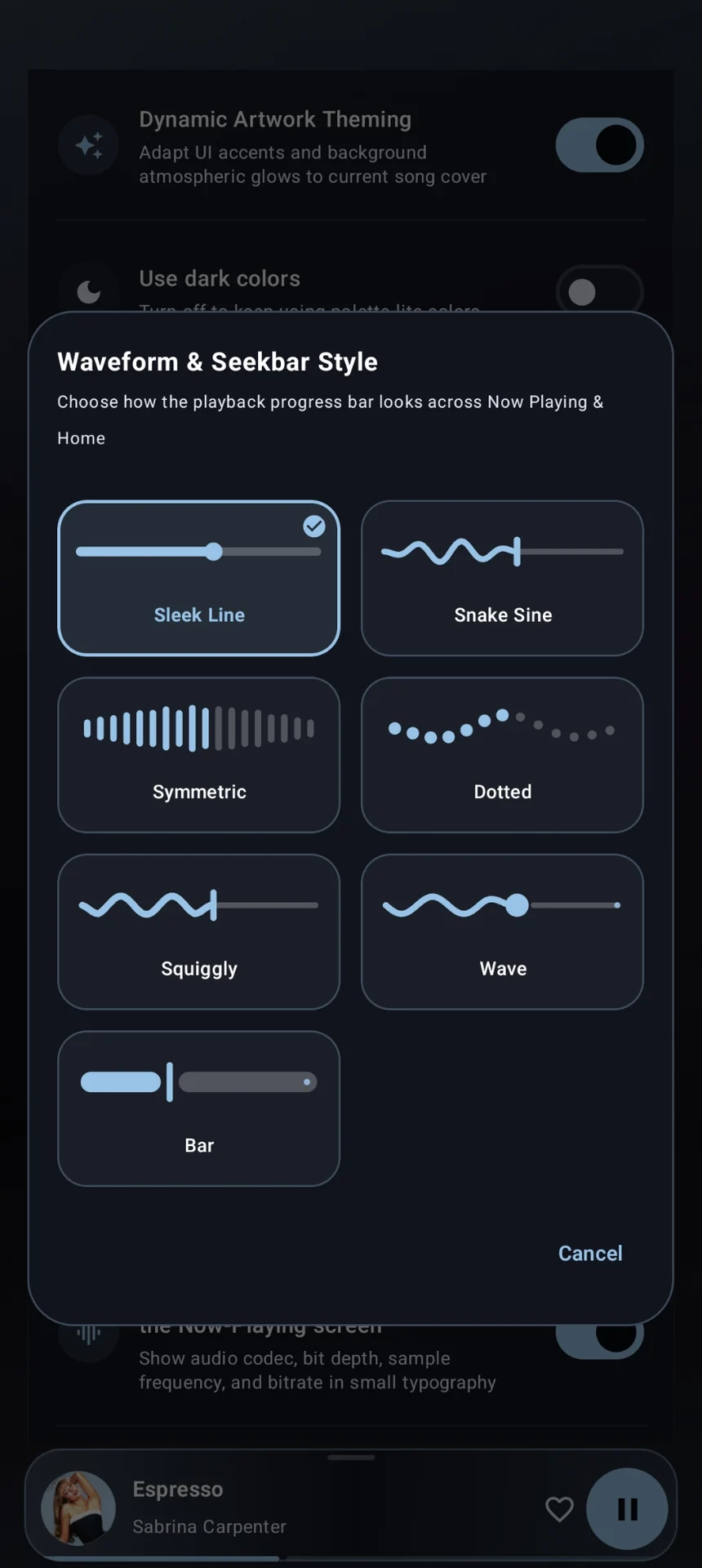
OffGrid Music 7 Waveform and Seekbar styles selector

7 Waveform & 4 Mini-Player Styles

  • Choose visually from Sleek Line, Snake Sine, Symmetric, Dotted, Squiggly, Wave, and Bar
  • 4 Mini-Player styles: Floating Pill, Bottom Bar, Artwork Glass & Compact Slim
  • Dual-Mode Sleep Timer: Time-based (up to 180 min) or Track-based (up to 50 tracks)
  • 90/120Hz High Refresh Rate smoothness across phones & tablets
Chapter 04 · Insights & Cloud Sync

Your Year in Sound. Any Day.

Don't wait until December for a wrapped recap—explore live listening streaks, 6-slide Calendar Wrapped Stories, and optional encrypted cloud backups anytime.

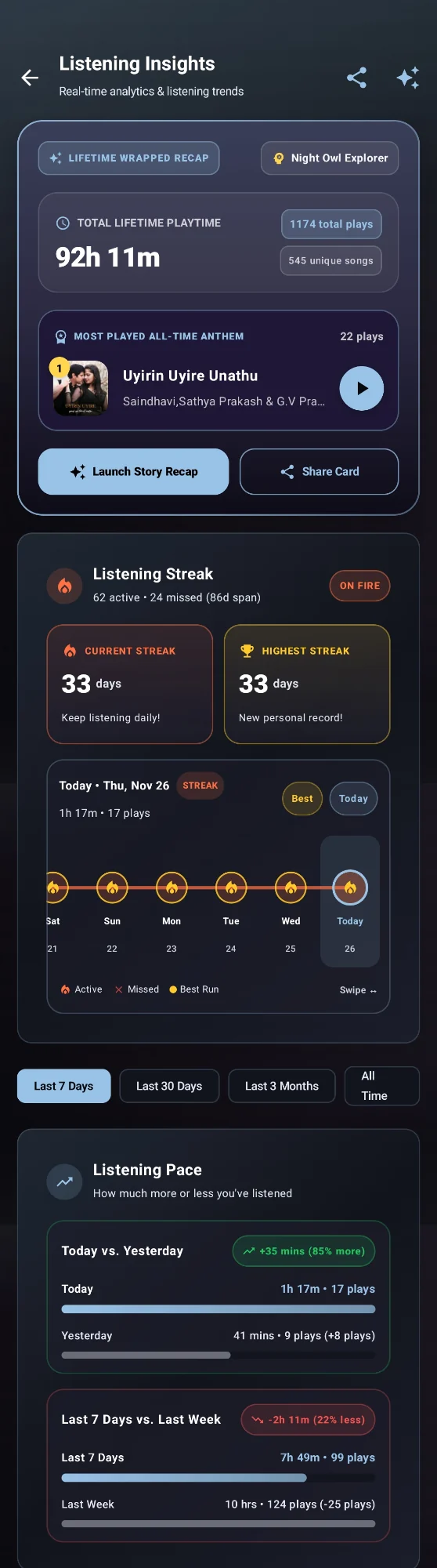
OffGrid Music Listening Insights with 92h playtime, 33 day streak, and listening pace

Real-Time Listening Insights

Track total playtime, active streaks, daily pace comparisons, Top Tracks, Top Artists, and custom track-completion thresholds across Today, 7 Days, 30 Days, or All Time.
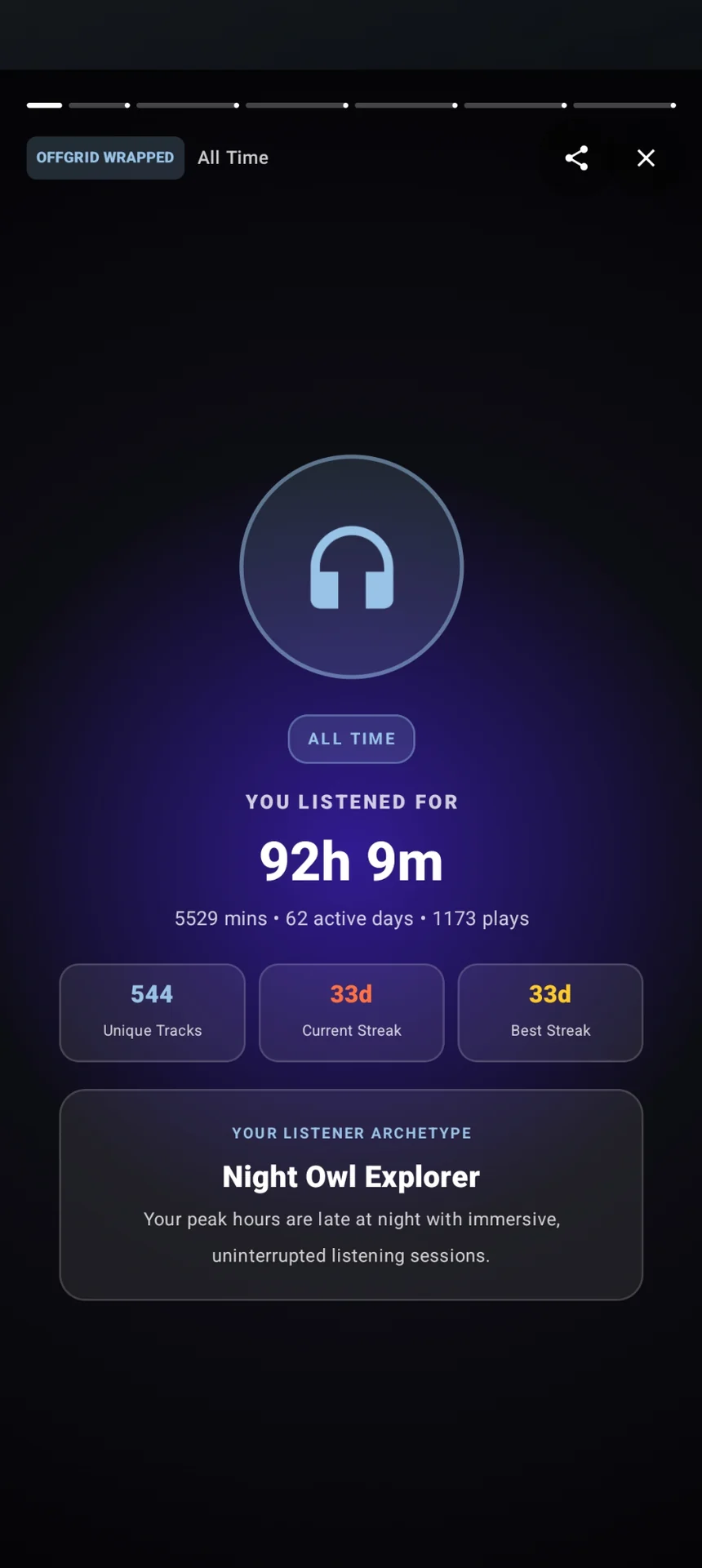
OffGrid Music 6-Slide Interactive Wrapped Story showing Night Owl Explorer archetype

6-Slide Calendar Wrapped Story

Launch an animated Wrapped Story for any preset or custom Calendar date range, discover your Listener Archetype, and export high-resolution stats cards in one tap.
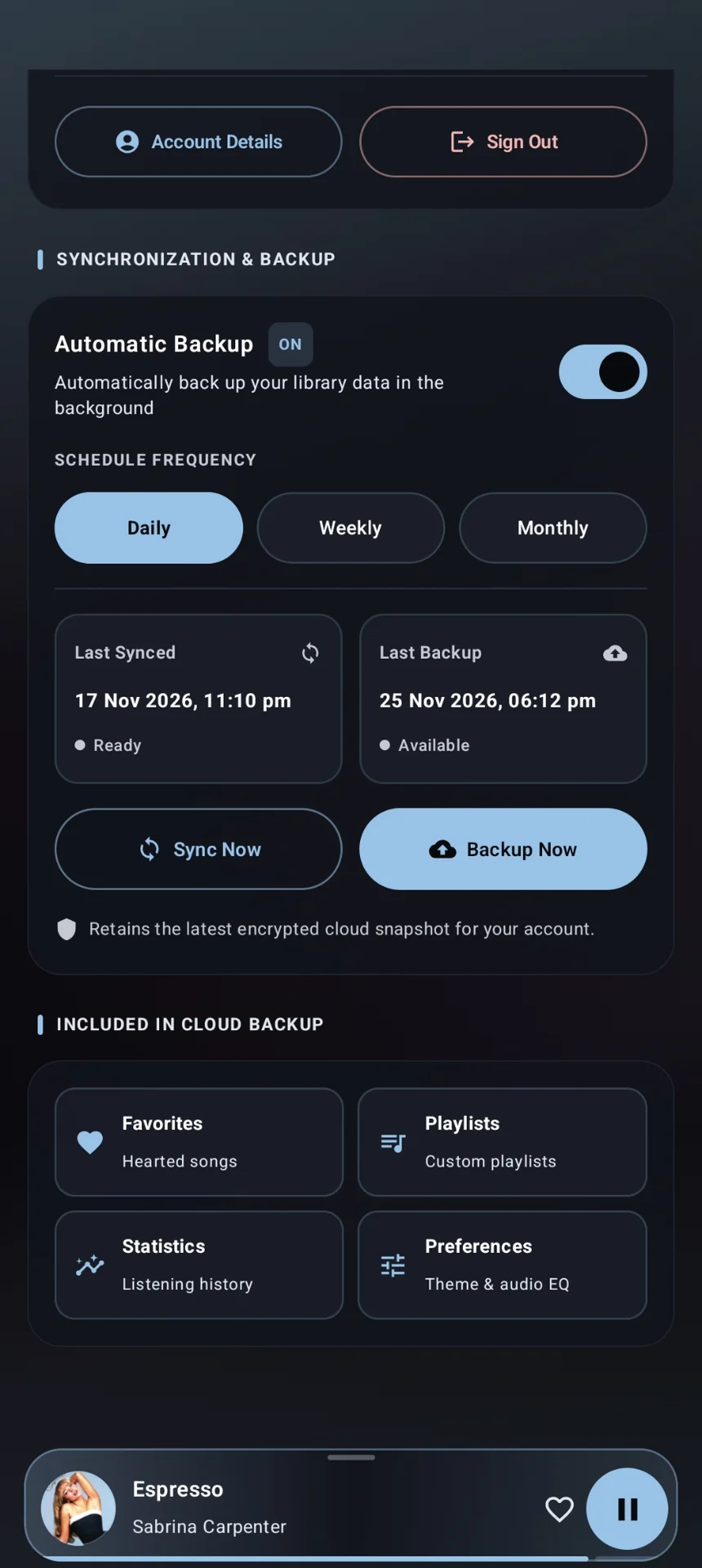
OffGrid Music Optional Encrypted Cloud Backup and Sync settings

Optional Encrypted Cloud Backup

Stay 100% local with no account—or sign in with Google or Email/Password to back up Favorites, Playlists, Stats, Lyrics Offsets, and Preferences Daily, Weekly, or Monthly.

Why Switch to OffGrid

How OffGrid compares to typical offline players.

Feature Area Typical Offline Players OffGrid Music
Visual Personalization One fixed dark or light layout 15 UI layouts across 4 screens, Pure AMOLED Black, RGB Wheel, Dynamic Artwork, Glass/Gradient toggles & 7 Waveforms
Lyrics Experience Static text or no lyrics support Live synced .lrc across 3 Lyrics UIs, Live Lyrics Home Screen Widget, ±ms offset & optional AI Translate/Transcribe
Track Transitions Hard cuts or uneven volume drops Gapless playback, 0–12s equal-power Crossfade, plus customizable Play Fade-In & Pause Fade-Out
Per-Song Control Only Repeat Off / All / Infinite One "Repeat this song" (1–10×) on active or queued tracks, A–B Loop, Timestamp Bookmarks & Sonic DNA Radio
Listening Insights Basic play counter at best Listening Streaks, Pace Analytics, 6-slide Calendar Wrapped Story & one-tap shareable stats cards
Shared Listening Strictly solo listening OffGrid Jam lets 2–10 friends listen in sync and share local songs (up to 25 MB) directly device-to-device
Cloud Backup Lose playlists & stats on new phones Optional Google or Email/Password encrypted cloud backup (manual or Daily/Weekly/Monthly) — or 100% local
Help, FAQ & Feedback

Frequently Asked Questions

App safety, Google Sign-In, cloud backups, Off-Grid Jam, Gemini AI API key help, playback tips & more.

14 questions
Trust & Safety The app is not published on the Google Play Store. Is it really safe to use?
Yes. OffGrid Music is completely open source on GitHub with zero ads, zero trackers, and zero hidden permissions. Every APK is built and published transparently through GitHub Releases so anyone can inspect the source code and verify every build.
Account & Backup In what ways can I sign in to OffGrid Music?
You can sign in with Google Sign-In or create an Email & Password account—or skip sign-in completely and use OffGrid Music 100% locally with no account required.
Trust & Safety If I use Google Sign-In, will my data get stolen?
No. Google Sign-In is used solely to authenticate your optional cloud backup account. OffGrid Music never accesses your Gmail, Drive, or contacts, never sells data, and never uploads your local audio files.
Account & Backup What data is backed up when I sign in?
Your Favorites, Custom Playlists, Smart Playlists, Listening Statistics & History, Synced Lyrics & Per-Song Timing Offsets, Folder Include/Exclude Rules, Custom Home Feed Configurations, and App Preferences (theme & audio EQ). Your actual MP3/FLAC music files and any personal Gemini API key are never uploaded.
Account & Backup Where is my backed-up data stored?
Backups are stored as an encrypted cloud snapshot tied strictly to your authenticated Firebase account. You can trigger Backup Now, Sync / Restore Now, or schedule automatic Daily, Weekly, or Monthly backups—or export local JSON backups anytime.
Off-Grid Jam How does Off-Grid Jam work?
OffGrid Jam lets 2 to 10 friends listen in real-time sync. Host a room and share the Invite Code, Invite Link, or QR Code. Participants stay synced to playback, and approved local songs (up to 25 MB) can be shared directly device-to-device without uploading your library to cloud storage.
AI & Lyrics Is my Gemini API key safe?
Yes. AI Lyrics Studio is turned off by default. If you choose to connect your own Gemini API key, it is stored encrypted strictly on your device and is excluded from all cloud backups and diagnostics exports.
AI & Lyrics How do I get and add a Gemini API key for lyrics translation or transcription?
Create a free API key in Google AI Studio, open OffGrid Music Settings → Lyrics & AI Studio, enable Optional Gemini AI Lyrics Studio, and paste your key. Once active, you can translate synced lyrics into English, Tamil/Tanglish, Hindi, or Malayalam—or transcribe audio into timestamped .lrc lyrics with one-tap Undo.
AI & Lyrics I'm facing API key errors — what should I do?
Double-check that your key has no extra spaces, hasn't hit its free-tier rate limit in Google AI Studio, and that your device has an active internet connection when running AI translation/transcription. If the issue persists, generate a fresh key or email us a screenshot at offgridmusicsupport@gmail.com.
Playback & Library What is Smart Shuffle (Smart Queue) and how does it work?
Smart Shuffle and Sonic DNA Radio analyze your library and currently playing track's vibe to build fresh, balanced queues without repeating the same handful of songs back-to-back—while keeping full 1:1 drag-and-drop control over your Up Next queue.
Playback & Library Does OffGrid Music work completely offline?
Yes! Playing local music (across 12 formats including MP3, FLAC, OPUS, WAV, M4A, and AIFF), synced .lrc lyrics, 5-Band EQ, Wrapped Stats, Playlists, and Home Screen Widgets all work 100% offline—perfect for flights, commutes, and off-grid listening.
Playback & Library Why are some of my local audio files not appearing in my library?
Check two settings in Library & Scanner: (1) Short Audio Clip Filter (set between 0–180s to hide ringtones/voice notes—lower it if short tracks are filtered out), and (2) Folder Include / Exclude Rules to ensure the folder containing your songs is included, then tap refresh or run a scan.
Playback & Library How can I customize the Home Feed, Bottom Bar, or Now Playing screen?
Open Settings → Screen Layout Studio to preview and switch between 4 Now Playing, 4 Home, 4 Playlists, and 3 Lyrics UI layouts (including Combo View). In Appearance & Home Feed settings, you can also show/hide/reorder Home sections, rearrange the 5 bottom bar tabs, and pick from 7 waveform styles and 4 mini-player styles.
Updates & Tips Will installing a new app update delete my playlists, favorites, or settings?
No. Install any newer OffGrid Music APK directly over your existing app—do not uninstall first. All of your playlists, favorites, synced lyrics offsets, custom cover art, listening stats, and settings stay right where you left them.

Queries, Bug Reports & Feature Suggestions

offgridmusicsupport@gmail.com

Still have a question, found a bug, or have a feature idea? Send us an email with details (and attach a screenshot if you ran into an error) and we'll help as soon as possible.

✉ Send Email
Free · Open Source · Ad-Free

Ready to take your music OffGrid?

Download the latest signed Android APK directly from GitHub Releases—or support ongoing independent development with a coffee.

Android 7.0+ · Update directly over your existing app without losing playlists or stats.